6 months ago
Your Guide to a Cloud Based YouTube Comment Scraper
At its core, a cloud-based YouTube comment scraper is a specialized tool that pulls public comments from YouTube videos, channels, or entire playlists for you. The magic happens on powerful remote servers, not your own computer, which is what gives it a serious edge in speed and scalability. This means you can gather data from hundreds of thousands of comments without bogging down your machine or running into YouTube’s rate limits.
Why YouTube Comments Are a Goldmine for Marketers
Forget focus groups. YouTube is the world’s biggest, most candid conversation, and the comment section is where the real action is. It’s a raw, unfiltered stream of opinions, product feedback, and what people are really thinking. For anyone in marketing, content creation, or research, this is pure gold.
Of course, nobody has time to manually sift through thousands of comments hoping to find a few nuggets of insight. That’s where a cloud-based YouTube comment scraper comes in. It does the heavy lifting, turning that chaotic mess of conversation into clean, structured data you can actually work with.
Unlocking Unfiltered Audience Insights
Imagine you just launched a new gadget. Now imagine being able to instantly tap into thousands of genuine customer reactions from a competitor’s review video. That’s the kind of power we’re talking about. You can see exactly which features people are raving about, what their biggest frustrations are, and even discover new ways they’re using a product that you never considered.
By turning raw comments into organized data, you stop guessing and start making decisions based on what your audience is actually saying. This is how you find a real competitive advantage.
With this data-driven approach, you can:
- Refine Your Marketing: Pinpoint the exact words and emotional hooks that connect with your audience.
- Find Content Gaps: See what questions people are asking over and over, then create the content that gives them the answers.
- Track Brand Sentiment: Keep a finger on the pulse of how people are talking about your brand across relevant videos in real-time.
The Growing Importance of Comment Data
And this data is only getting more valuable. By 2026, YouTube is expected to have 2.77 billion monthly viewers, and the trend shows that comment interactions are growing even faster than likes. The platform is becoming more about community and conversation, which makes the comment section the new frontline for understanding your audience. You can dig deeper into web data trends with Scrapingdog.com’s analysis.
Our own tool, the YouTube Comments Downloader, was built specifically to make this YouTube data accessible to everyone, no coding required. It helps you turn that goldmine of public opinion into a clear, actionable resource so you can make smarter decisions for your brand or channel, faster.
Choosing Between Cloud and Desktop Scrapers
So you need to export YouTube comments. The first big decision you’ll face is whether to use a cloud-based scraper or a local desktop application. This choice isn’t just about software; it dictates the speed, scale, and reliability of your entire project.
Think of it like this: you can either rent a professionally managed supercomputer (the cloud) or try to build and maintain a powerful server in your own basement (a desktop app).
For a quick, one-off job, a desktop tool might get you by. But if you’re serious about large-scale research or ongoing brand monitoring, you’ll hit the limits of a local app almost immediately. Your own computer’s power, your internet connection, and your single IP address create a hard ceiling on what you can actually accomplish.
The Scalability Challenge
The real difference boils down to raw power. A desktop app is handcuffed by your computer’s own memory and processing capabilities. Try to pull comments from a viral video with millions of interactions, and you’ll likely watch your machine grind to a halt or the app just crash.
A cloud-based YouTube comment scraper, on the other hand, is built for this kind of heavy lifting. It runs on a distributed network of powerful servers, letting you process massive datasets without slowing down your own computer one bit. You can line up multiple jobs, scrape entire channels, and handle millions of comments without breaking a sweat.
This flowchart gives a good sense of when a dedicated tool becomes essential.
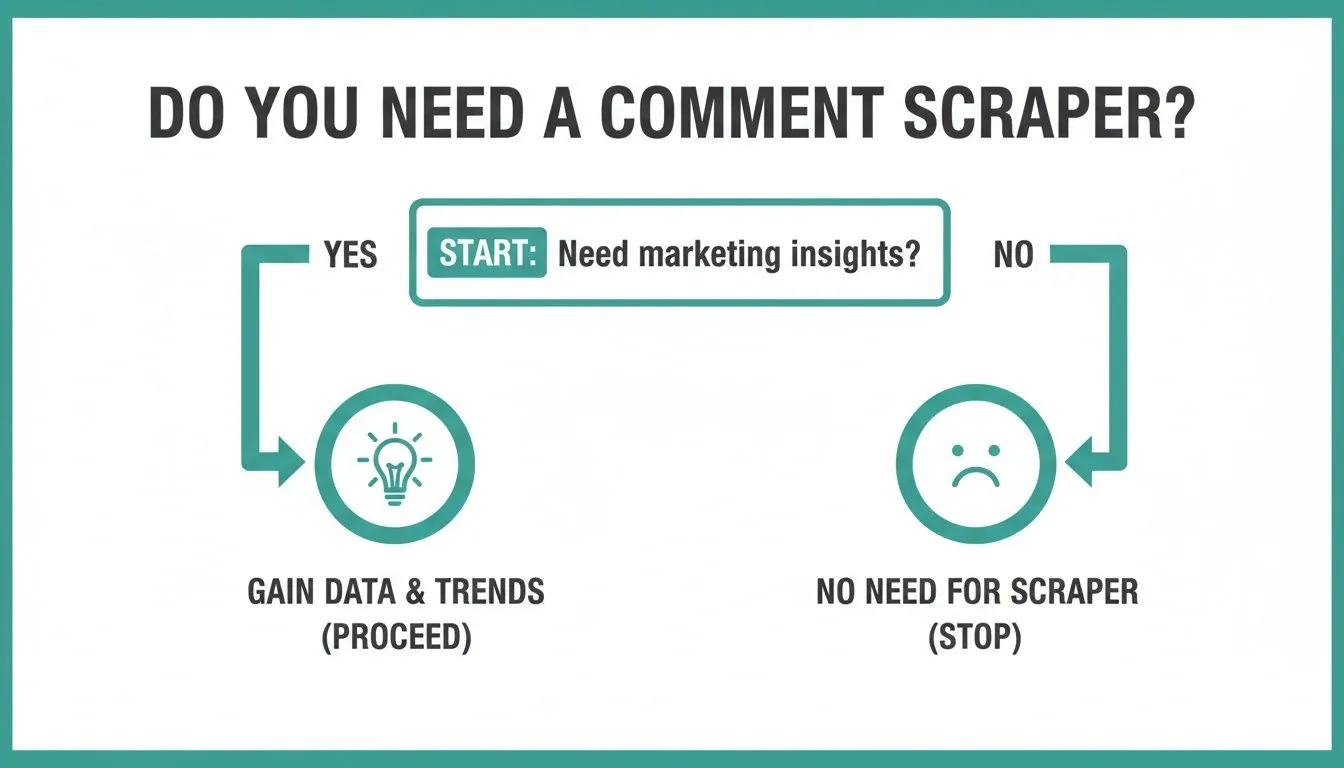
As you can see, if you’re aiming to pull real marketing insights from YouTube, a powerful scraper isn’t a “nice-to-have”; it’s a core part of your data-gathering toolkit.
Performance and Reliability
Performance is more than just speed; it’s about being able to finish the job without getting shut down. When you run a desktop scraper, all requests come from your home or office network’s single IP address. If YouTube’s servers see too much activity from that one IP, they can flag it and temporarily block you, bringing your research to a dead stop.
Cloud services are designed to completely sidestep this issue. They operate using huge pools of IP addresses, automatically rotating them to look like normal user traffic. This clever approach prevents blocks and ensures your exports run smoothly, even when you’re pulling data from hundreds of videos at once.
A cloud solution is engineered for uninterrupted operation. It handles all the complex, behind-the-scenes work of large-scale data extraction so you can focus on analyzing the results, not on troubleshooting network errors.
To make the differences crystal clear, here’s a direct comparison of the two approaches.
Cloud-Based Scraper vs Local Desktop Scraper Comparison
The table below breaks down the key operational differences between running a scraper in the cloud versus on your local machine.
| Feature | Cloud-Based Scraper (e.g., YouTube Comments Downloader Service) | Local Desktop Scraper (Typical) |
|---|---|---|
| Scalability | Virtually unlimited; easily processes millions of comments. | Limited by your computer’s hardware and network speed. |
| IP Blocking | Avoids blocks by using a large, rotating pool of IP addresses. | High risk of being rate-limited or blocked by YouTube. |
| Performance | Runs on powerful remote servers, freeing up your machine. | Drains your local CPU, memory, and bandwidth. |
| Accessibility | Access from any device with an internet connection. | Tied to the specific computer where it’s installed. |
| Maintenance | The service provider handles all updates and infrastructure. | You are responsible for software updates and troubleshooting. |
As you can see, for any task that requires scale and reliability, a cloud-based tool has a decisive advantage.
The Best of Both Worlds
While the power of a cloud-based YouTube comment scraper is undeniable for serious work, we know some users prefer a local tool for smaller tasks or like the idea of a one-time purchase.
Recognizing this, our YouTube Comments Downloader offers both a robust cloud service and a lifetime desktop application. This gives you the flexibility to pick the right tool for the job. You can check out the specifics of the desktop app with its lifetime license here.
Ultimately, for any professional marketer, researcher, or creator who needs to analyze YouTube comments reliably and at scale, the cloud-based approach is simply the better, more powerful solution.
What to Look For in a Top-Tier Comment Scraper
Let’s be clear: not all comment scrapers are built the same. A basic tool might pull text, but the right tool is more like a dedicated research assistant. It takes the chaotic, fast-moving world of YouTube comments and turns it into a clean, structured dataset you can actually work with.
A top-tier scraper goes deep. It doesn’t just grab the comment; it grabs the entire context. You need the full thread, including all replies, to see how conversations unfold. Crucial details like author handles, like counts, reply counts, and timestamps are what give the data its power, turning a simple list of comments into a rich source of insight.
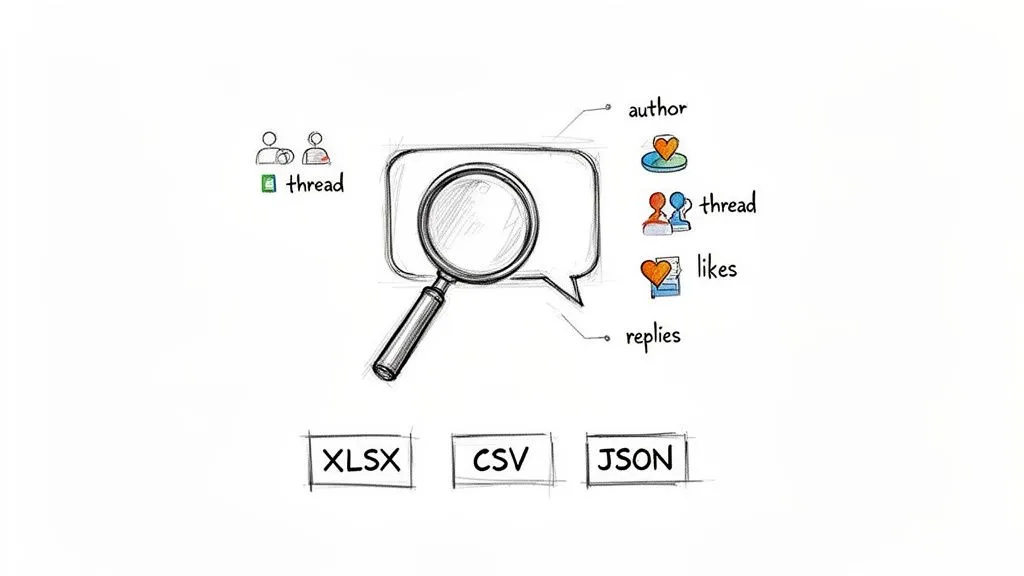
Without that level of detail, you’re only seeing shadows of the real conversation. This is the stuff that fuels everything from sentiment analysis to spotting the next big influencer in a niche.
Versatile and Ready-to-Use Formats
Once you’ve collected all that great data, you need to be able to use it easily. A truly effective scraper won’t lock your data into a proprietary format. It should give you flexible, analysis-ready export options because different tasks call for different tools.
Look for a scraper that offers these standard formats:
- XLSX and CSV: The bread and butter for anyone working in spreadsheets. These files open right up in Microsoft Excel or Google Sheets, so you can start sorting, filtering, and charting without any technical hurdles.
- JSON: This is the gold standard for developers and data scientists. Its structured nature makes it perfect for feeding into custom Python scripts or loading into a database for more complex analysis.
- TXT: Don’t underestimate the simple text file. Clean text exports are fantastic for dropping directly into AI tools like ChatGPT to get quick summaries or pull out major discussion themes.
The whole point is to get from YouTube to your analysis environment with zero friction. The YouTube Comments Downloader provides all of these formats, making sure your data is ready for your toolkit, whatever that may be.
Advanced Filtering and Search Capabilities
Trying to manually find a specific keyword in a video with 50,000 comments is a nightmare. This is where a powerful search function becomes absolutely essential. A great cloud based YouTube comment scraper should let you instantly find the conversations that matter most.
Think about searching an entire channel for every mention of your product, a competitor’s name, or a trending topic. The best tools make this simple. For instance, our YouTube Comments Downloader has a powerful, typo-tolerant search. That means it finds what you’re looking for even if someone misspelled a keyword, a small detail that prevents you from missing out on valuable feedback due to a simple typo.
An intelligent search function is what separates a data-dump tool from a true research instrument. It lets you isolate the signal from the noise, whether you’re hunting for feature requests, common complaints, or glowing testimonials.
This is the kind of feature that saves you hours of work and delivers much sharper insights.
Comparing Market Options
The field for these tools is definitely growing. While there are various services for extracting data, many are generic platforms that handle all kinds of websites. Services like ScrapingBee or Outscraper are powerful but can be complex, often requiring technical setup to get the specific YouTube data you need. Similarly, you can find a list of different YouTube comment scrapers from apify.com, but these often appeal more to developers.
The problem with generic tools is they aren’t optimized for the specific structure of YouTube comments. You might get the raw text but miss out on threaded replies, like counts, or other crucial metadata. The YouTube Comments Downloader was built specifically for this one job. It provides a seamless, no-code experience focused entirely on delivering clean, rich, and reliable YouTube comment data without the steep learning curve of a general-purpose tool. For marketers and researchers, this specialized approach is a significant advantage.
How to Turn Raw Comments Into Actionable Insights
Pulling down all that data with a cloud-based YouTube comment scraper is really just the beginning. The magic happens when you turn that mountain of raw text into a clear strategy. This is where you translate thousands of individual voices into a roadmap for better content, stronger products, and much smarter marketing.
Think of each comment as a single data point: an opinion, a question, or a piece of feedback. By itself, it’s just noise. But when you organize and analyze them together, you start to see patterns that are completely invisible when you’re just casually scrolling through a video’s comment section.
Let’s break down a few practical workflows for different roles.
Workflow for Marketers: Competitor Analysis
For any marketer, a competitor’s YouTube channel is basically a free intelligence report. Their comment sections are goldmines of uncensored feedback about their products, marketing, and customer service.
Here’s a simple way to tap into that:
- Target and Scrape: Pick your top three competitors. Use the YouTube Comments Downloader to export all the comments from their most popular product videos and their most recent uploads.
- Filter for Keywords: Once you have the XLSX file, open it and use the search function to filter for words like “wish,” “feature,” “disappointed,” “love,” and “problem.” This immediately isolates the comments that contain valuable product feedback.
- Identify Pain Points: Keep an eye out for recurring complaints. Are people constantly getting frustrated with a specific feature? Is the price a sticking point? These are the market gaps your product can fill.
- Find Unmet Needs: Pay close attention to feature requests. When you see comments like, “I just wish it could do X,” you’ve found a direct line to what customers want, something your competitor is overlooking.
This process gives you a serious competitive edge, built directly from the unfiltered voice of your target audience. You’re no longer guessing what the market wants; you’re reading it plain as day.
Workflow for Creators: Content Ideation
If you’re a creator, your own comment section is your single best source for new ideas. Your audience is literally telling you what they want to see next. You just need a system to listen properly.
This workflow helps you pinpoint your most popular topics and find your most engaged fans:
- Export Your Own Data: Start by scraping the comments from your last 10-20 videos. This gives you a fresh, relevant dataset of what your community is fired up about right now.
- Analyze Question-Based Comments: Search your exported data for question marks (“?”). This trick instantly surfaces all the questions your audience is asking, showing you exactly where the knowledge gaps are that your future videos can fill.
- Identify Power Users: Sort the data by the author’s handle. This groups all comments by individual users, making it a breeze to spot your most active and loyal community members. Giving these fans a shout-out can build incredible loyalty.
- Discover New Angles: Look for comments where people share personal stories or unique ways they’ve applied your advice. These often contain the seeds for new content angles you’d never have thought of on your own.
By systematically analyzing your own comments, you create a powerful feedback loop. It ensures your content strategy is always in sync with your audience’s interests, which naturally leads to higher engagement and faster channel growth.
Workflow for Researchers: Sentiment Analysis
For academic or market researchers, a cloud-based YouTube comment scraper is a phenomenal tool for gathering massive datasets for sentiment and thematic analysis. The goal here is to understand public opinion at scale.
After collecting the comments, a dedicated YouTube comments analyzer is the perfect next step for turning all that raw text into meaningful insights.
Here’s a modern, AI-powered workflow:
- Gather a Large Dataset: Scrape comments from dozens or even hundreds of videos related to your research topic, whether it’s a political issue, a social trend, or a new product category. Export the data as a clean TXT file.
- Prepare for AI Analysis: The YouTube Comments Downloader’s TXT export is designed to be easily fed into AI models. Each comment gets its own line, creating a clean, simple format that machines love.
- Prompt for Thematic Analysis: Upload the TXT file to an AI tool like ChatGPT. Use a prompt like: “Analyze the attached YouTube comments. Identify the top 5 recurring themes and provide 3 example comments for each theme.”
- Perform Sentiment Scoring: Follow up with a second prompt: “Based on the comments, classify the overall sentiment as positive, negative, or neutral. Provide a percentage breakdown and explain the reasoning for your classification.”
This combination of a powerful scraper and an AI tool lets researchers process huge volumes of qualitative data in minutes, not months. You can even take this a step further with our specialized guide on using our AI analyzer for YouTube comments.
Ultimately, these workflows show that a scraper is so much more than a data collection tool; it’s the engine that drives real insight.
Understanding YouTube Scraping Policies and Best Practices
So you want to scrape YouTube comments. It’s a goldmine of raw, unfiltered audience feedback, but you’ve probably heard it can be a bit of a gray area. Let’s clear the air on how to do it right.
The bottom line is simple: analyzing public information is a standard practice for research and marketing. The key is to do it responsibly, without crossing any lines. This isn’t about stealing private data or spamming people. It’s about understanding market trends, brand sentiment, and what audiences are actually talking about using data that’s already out in the open.
Navigating YouTube’s Terms of Service
YouTube’s main job is to keep the platform stable for its billions of users. Their Terms of Service are designed to prevent automated bots from overwhelming their servers or ruining the user experience. This is exactly why firing up a generic, poorly made script is a fast way to get your IP address blocked.
This is where a professional cloud based YouTube comment scraper makes all the difference. A tool like the YouTube Comments Downloader isn’t a blunt instrument; it’s designed to interact with the platform respectfully. It gathers data in a way that doesn’t disrupt the service, ensuring you get what you need without setting off alarms. It understands the ecosystem it’s working in.
The distinction is critical: responsible scraping is about analysis, not interference. The goal is to gather public data for insights in a way that is respectful to both the platform and its users.
Best Practices for Ethical Data Collection
Playing by the rules isn’t just about avoiding a ban; it’s about ensuring the data you collect is actually useful and that your research has integrity. Think of it as being a good neighbor in the digital space.
Here are a few simple guidelines to follow:
- Focus on Aggregate Trends: The real value isn’t in what one specific person said. It’s in the overarching patterns, trends, and sentiments you can find across thousands of comments. Look for the forest, not the individual trees.
- Anonymize Data When Possible: When you’re sharing your findings in a report or presentation, strip out any personal details. The insight comes from the what (the comment), not the who (the user).
- Use Data for Legitimate Research: Your goal should be genuine understanding: learning about customer pain points, spotting content opportunities, or measuring public opinion. Never use this data for spam or invasive marketing.
- Choose a Respectful Tool: Don’t just grab any scraper off the internet. Use a service built specifically for the platform you’re analyzing, one that’s designed to work without causing strain or breaking things.
Ultimately, it comes down to a simple trade-off. YouTube comments offer immense value, and in return, we owe the platform and its users a basic level of respect. By sticking to these principles, you can confidently turn that public data into powerful insights.
Getting Started with YouTube Comments Downloader
Getting your hands on YouTube comment data shouldn’t be a chore. With a cloud‑based YouTube comment scraper, the whole process can be surprisingly quick and painless. We built the YouTube Comments Downloader around this very idea: let’s get you from a simple YouTube link to a complete, organized dataset with just a few clicks. No coding, no complicated software, no fuss.
We want you to see how easy it is right away. That’s why we give you free credits when you sign up, so you can run your first export and see the results for yourself without any commitment.
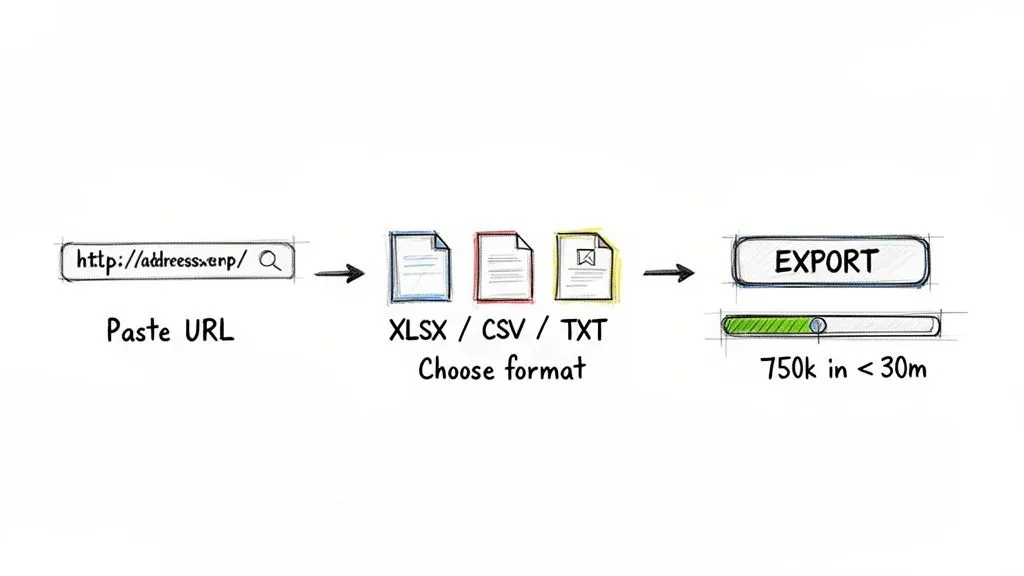
The entire workflow is just three simple steps. We designed it this way to get you from a question to a real insight as fast as humanly possible.
Your Three-Step Workflow
Getting started is as easy as it sounds. We take care of all the technical heavy lifting on our cloud servers, so your computer doesn’t have to. You just focus on the research.
- Paste Your Target URL Grab the URL from any public YouTube video, playlist, or even a full channel. Just copy and paste it right into the tool. That’s it.
- Choose Your Export Format Decide how you want your data. XLSX or CSV are perfect for spreadsheets like Excel and Google Sheets. If you’re using AI tools for analysis, TXT might be a better fit.
- Start the Export Hit the button and let our system get to work. Our cloud infrastructure is built for serious speed; it can pull up to 750,000 comments in under 30 minutes.
Before you know it, you’ll have a clean, analysis-ready dataset with full comment threads, author details, and all the key engagement metrics.
From URL to Analysis in Minutes
The real magic of a no-code solution like this is its efficiency. You don’t have to worry about your IP getting blocked, managing software updates, or whether your laptop can handle the load. The system is built to clear every hurdle between you and the data you need. Of course, to get started with YouTube comment analysis, you first need a way to download YouTube content and its associated data, which is the first step our tool handles for you automatically.
Our goal is to make sophisticated data analysis accessible to everyone. You don’t need to be a data scientist to uncover powerful insights from YouTube comments.
By taking the technical headaches out of the equation, the YouTube Comments Downloader empowers marketers, creators, and researchers to focus on what really matters: understanding the conversation. This turns a public discussion into a strategic asset. To see more of what’s possible, check out our detailed guide on the YouTube comment downloader tool. You can quickly turn that raw data into a real competitive advantage.
Frequently Asked Questions
Thinking about diving into YouTube comments for your research? You probably have a few questions. Let’s walk through some of the most common ones we hear from people just getting started with a cloud-based YouTube comment scraper.
What Kind of Data Can I Actually Get?
A good tool gives you way more than just the comment text. With a service like the YouTube Comments Downloader, you get the whole story, neatly organized for analysis.
You can expect to see things like:
- Full Comment Threads to track how a conversation unfolds.
- Author Handles so you can spot influential voices in the community.
- Like Counts and Reply Counts to see which comments are actually resonating.
- Timestamps and Permalinks for quick referencing and citations in your work.
It’s this complete picture that transforms a simple list of comments into something you can really work with.
How Many Comments Can I Scrape at Once?
This is where cloud-based tools completely change the game. If you’ve ever tried this with a desktop app, you know they can buckle under pressure, often crashing when you give them a big video to chew on.
A cloud solution, on the other hand, is built for heavy lifting. We regularly see users process thousands of videos at once. One project successfully pulled over 750,000 comments in under 30 minutes, something that would bring most personal computers to a halt. You can queue up entire channels or playlists and just let the servers handle it.
Is Scraping YouTube Comments Allowed?
Yes, when it’s done responsibly. Analyzing public data is a standard practice in market research, academic studies, and content strategy. The line YouTube draws is at activity that disrupts their platform, which is what poorly designed bots often do.
Using a professional, dedicated tool is the key to gathering data ethically. It’s designed to work with the platform, not against it, which prevents you from getting blocked and ensures you get reliable data every time. The goal is to analyze public conversations, not to harvest private user information.
This approach lets you get the insights you need while being a good citizen of YouTube’s ecosystem. Other platforms, like Apify, also operate on this principle of managing platform rules for you. But for a simple, focused experience on just YouTube comments, a dedicated tool gets you to your data much faster.
What If I Am Not a Technical User?
That’s perfectly fine! The best tools today are designed for marketers, researchers, and creators, not just developers. With the YouTube Comments Downloader, the entire process is just three steps: paste a URL, pick a format like XLSX for Excel, and click to start.
There’s no code to write, no software to install, and no complex setup. The whole point is to make data analysis accessible to anyone who needs it, no matter their technical skill set.
Ready to turn YouTube’s biggest conversations into your best insights? YouTube Comments Downloader offers the fastest, most reliable way to get analysis-ready data. Start your free export today.