
7 months ago
A Guide to Using a YouTube Comment Downloader Tool
A good YouTube comment downloader tool is the quickest way to pull public discussions from YouTube and organize them into a clean, ready-to-use dataset. Instead of manually copying and pasting, these tools let you instantly export comments from videos, Shorts, live chats, and even entire channels into formats like XLSX or CSV.
Why YouTube Comments Are a Goldmine of Insight

Long gone are the days when a YouTube comment section was just a simple feedback box. It is now a living, breathing community forum where people share raw, unfiltered opinions every single second. This constant stream of conversation is an incredibly rich source of data.
For creators and marketers, these discussions are where you will find emerging trends, common frustrations your customers face, and honest feelings about your brand. But if you have ever tried to sift through thousands of comments by hand, you know it is a losing battle. You are bound to miss the most important insights.
Unlocking Strategic Value from Conversations
That is where a specialized YouTube comment downloader tool becomes a game-changer. It automates the entire extraction process, saving you countless hours of tedious work and giving you direct access to that data goldmine.
By tapping into this data, you can stop guessing what your audience thinks and start making strategic decisions based on what they’re actually saying.
Sure, there are other methods, like using the official YouTube API. But that route often requires serious coding skills and comes with strict usage quotas, making it slow and impractical for anyone needing to analyze comments at scale. A dedicated downloader is built for one job: getting you clean, comprehensive comment data, fast.
The Growing Importance of Comment Data
And the volume of this data is exploding. One recent study found that YouTube comments grew by a massive 38% in just one year, easily outpacing the growth of likes. This points to a major shift: viewers are no longer just passive watchers; they are active participants.
This surge in engagement means the comment section is more valuable than ever for:
- Gauging Real Audience Sentiment: Find out how people truly feel about your content or brand messaging.
- Spotting Emerging Trends: Notice recurring questions, keywords, and topics before they hit the mainstream.
- Building Community Loyalty: Identify your most dedicated followers and learn exactly what keeps them coming back.
Digging into these conversations is a fundamental part of modern community management. Our guide on how to do social listening on YouTube offers more advanced strategies for turning these comments into real intelligence. By transforming that unstructured text into an organized dataset, you can finally cut through the noise and find the signals that truly matter.
Performing Your First Comment Export in Minutes
Getting your hands on a clean, usable file of YouTube comments should be a quick job, not a technical nightmare. You do not need to be a coder or a data scientist to get started. Let’s walk through your first export so you can see just how fast you can go from a simple YouTube link to a file ready for analysis.
The whole process is incredibly direct. Whether you are targeting a single viral video, a 30-second Short, or the chat replay from a two-hour live stream, the core steps are identical. The goal is to get that structured data without any of the usual headaches.
Selecting Your Source and Format
First things first: find the content. All you need to do is copy the URL of the YouTube video, Short, or live stream you want to pull comments from. The tool takes it from there, instantly recognizing the video and getting ready for the export.
Now for the important part: thinking about what you will do with the data. Your end goal dictates the best file format to choose.
- XLSX (Excel): This is the go-to for most people. It drops everything into a familiar spreadsheet, making it a breeze to sort, filter, and whip up charts.
- CSV: A lightweight and universal format. It is perfect if you plan on importing the comments into other data tools or a database.
- JSON: This one is for the developers and researchers. It is the best choice if you need to programmatically work with nested data, like entire comment threads.
- HTML: Need a perfect visual clone of the comment section for a presentation or report? This format creates an exact replica you can screenshot or share.
- TXT: Just a simple, clean text file. It is surprisingly useful for feeding into AI models like ChatGPT to quickly get a summary of themes or sentiment.
Picking the right format upfront saves a ton of time you might otherwise spend on conversions. If you are just starting out, I almost always recommend XLSX because it is so versatile. For a deeper dive, you can check out our guide on how to export YouTube comments to CSV and other popular formats.
Downloading Your First Dataset
With your URL copied and format selected, you are ready to go. The tool handles the entire download process automatically. This completely replaces the soul-crushing task of manually scrolling and copy-pasting, a method that is not only slow but also guaranteed to introduce errors.
If you have ever tried using the official YouTube API, you know how frustrating it can be. It often involves writing code, dealing with strict usage quotas, and hitting roadblocks that can stop your work cold. This tool is designed to skip all of that and give you a direct line to the data you need.
The real win here is getting a clean, organized file in seconds. The export does not just grab the comment text; it also pulls all the crucial metadata—author names, reply counts, like counts, and timestamps—and lays it all out neatly for you.
Think about it this way: say you want to see what people are saying about a competitor’s new product launch video. You just paste that video’s URL, select XLSX, and hit download. A minute later, you can have that file open in Excel, sorting by “like count” to instantly find the most upvoted feedback or searching for keywords like “price” or “disappointed.” That is the kind of immediate insight you get.
Handling Large-Scale Comment Downloads for Big Projects
Sometimes, a single video’s comments just are not enough. When you need to analyze an entire channel or a specific topic across multiple videos, you will need to work with data in bulk. This is where a powerful YouTube comment downloader tool really shines, turning what could be a massive headache into a straightforward data-gathering exercise.
Think about it from a practical standpoint. A brand manager could pull every comment from a competitor’s channel to get a bird’s-eye view of their audience’s sentiment. Or, a sociologist might want to download all the comments from a playlist of news reports about a major event. These are the kinds of large-scale projects that require a more robust approach.
The whole idea is to make this process quick and painless.
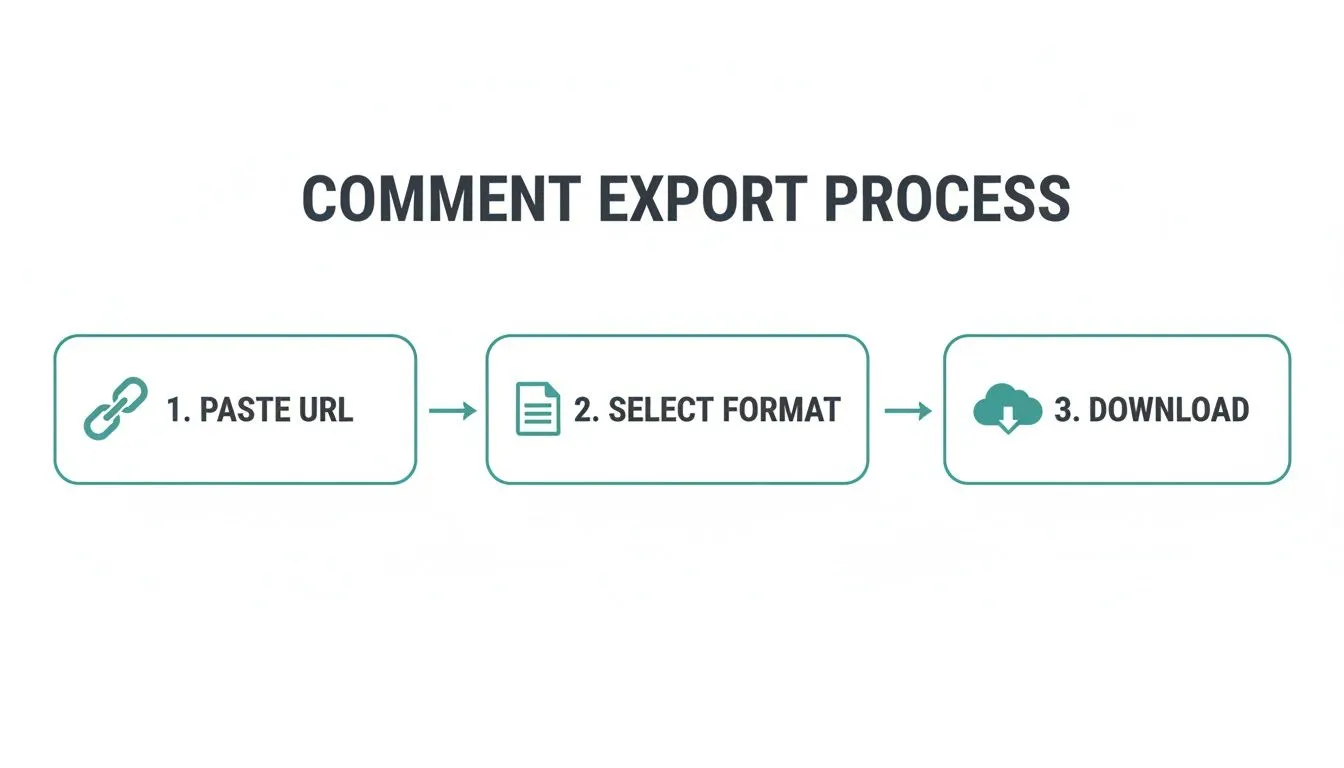
You can go from identifying your video sources to downloading a complete dataset in just a couple of clicks, getting you to the analysis phase faster.
Getting Around YouTube’s Built-In Limits
YouTube is massive. With a user base projected to hit 2.85 billion people by 2026, the sheer volume of comments represents an incredible source of public opinion for anyone in marketing, research, or content creation. You can get a sense of the scale by looking at the latest YouTube statistics and user data.
The problem is, trying to access this data directly through the official YouTube API can be frustrating. It comes with strict quotas and limitations that make downloading comments from thousands of videos nearly impossible. You will hit your daily limit before you even scratch the surface.
We built our tool specifically to solve this problem. It is not uncommon for our users to pull over 750,000 comments from a list of 3,000 videos in just a few minutes, a task that would be completely out of reach using other methods.
This kind of efficiency is a game-changer for anyone who needs deep, comprehensive data without getting bogged down by technical roadblocks. If you are planning a big export, our guide on how to bulk download YouTube comments walks you through the best practices.
The Real Value is in the Rich Metadata
The magic of a great comment export is not just the text itself; it is all the extra information, the metadata, that comes with it. A quality download gives you a neatly structured file that is ready for deep, meaningful analysis right out of the box.
Here is what you get in every export, which is crucial for understanding the full context:
- Full Thread Hierarchy: See exactly which comments are replies to others. This lets you trace entire conversations from start to finish instead of just seeing a jumbled list.
- Author Details: The name and channel handle for every commenter are included, so you can spot influential voices or track recurring participants in a discussion.
- Timestamps: Know precisely when each comment was posted. This is perfect for tracking how sentiment evolves over time, especially in the days and weeks after a video is published.
This structured data transforms a chaotic flood of comments into an organized dataset. Instead of a simple text file, you get a complete map of the conversation, making it easy to find the most-liked opinions, follow complex discussion threads, and uncover patterns you would have otherwise missed.
Choosing the Right Export Format for Your Analysis
Picking the right file format is the first step in making your analysis easier. Each format is suited for different tools and goals, so it is worth taking a moment to decide which one fits your project. Are you running a quick sentiment analysis, or are you building a complex database?
Here is a quick breakdown to help you choose.
| Format | Best For | Example Use Case |
|---|---|---|
| XLSX | General-purpose analysis in Microsoft Excel or Google Sheets. Great for sorting, filtering, and creating charts. | A marketer filtering for comments containing specific keywords to gauge reactions to a new product feature. |
| CSV | Importing data into spreadsheets, databases, or programming languages like Python. It is a universal, lightweight format. | A data scientist loading comments into a script to perform natural language processing (NLP) and sentiment analysis. |
| JSON | Developers and researchers working with complex, nested data structures. Perfect for preserving thread hierarchy. | A web developer building a custom dashboard to visualize conversation threads and user interactions. |
| HTML | Creating a readable, offline archive of the comments that looks just like it does on YouTube, threads and all. | A creator saving an offline copy of the comments from a milestone video for their personal archives. |
| TXT | Simple text-based analysis or feeding data into AI models like ChatGPT for summarization or topic modeling. | A researcher feeding raw comment text into an AI to identify the top five themes discussed in a video. |
Ultimately, the best format depends entirely on what you plan to do with the data. For most users, XLSX or CSV is the perfect starting point for hands-on analysis in a spreadsheet. For more technical projects, JSON offers the most detailed structure.
Turning Raw Data Into Actionable Insights
Getting a spreadsheet packed with thousands of comments is a great starting point, but that is all it is, a start. The real magic happens when you start digging into that data, turning a wall of raw text into clear, strategic intelligence. This is where you find the story hidden within the chatter.
Fortunately, you do not need to be a data scientist to uncover these insights. A solid YouTube comment downloader gives you the tools to begin your analysis right away, often before you even export a single file.
Pinpointing Key Information with Built-in Search
Most of the heavy lifting can actually be done inside the tool itself. Before exporting, use the built-in search and filter functions to narrow your focus. Think of this as your first pass, helping you instantly isolate comments about a specific keyword, hashtag, or even a particular emoji.
For instance, if you just reviewed a new camera, you could search for “battery life” or “autofocus” to see exactly what viewers are saying about those features. A marketing team could filter for a competitor’s name to see how they are being mentioned in the conversation. This simple step saves a ton of time and directs your attention to the feedback that truly matters.
This is the fastest way to test a hypothesis. Instead of scrolling for hours wondering if people care about a certain topic, you can get an answer in seconds.
This detailed feedback is also crucial for understanding who your audience really is. When you know what different groups of viewers are saying, you can build much more effective Audience Segmentation Strategies for Creators for future content.
Preparing Your Data for Analysis Platforms
Once you have a clean, focused export, it is time to take it to the next level. The structured data from your download is perfectly formatted for everything from simple spreadsheets to powerful AI tools. The export format you chose earlier will guide your next step.
- XLSX files in Excel or Google Sheets: Open your spreadsheet and start exploring. You can use pivot tables to summarize which videos get the most questions or which topics earn the highest like counts.
- TXT files with AI tools: A clean text export is perfect for pasting directly into tools like ChatGPT. You can ask it for an automated sentiment analysis, a summary of recurring themes, or even a list of the most common questions people are asking.
A Practical Scenario: Uncovering Product Feedback
Let’s walk through a real-world example. Imagine you are with a company that just launched a new microphone for vloggers. You download all the comments from your launch video and a few popular review videos.
- Open the XLSX in Excel: First, you sort by “like count” to see what is resonating most. A top comment with 500+ likes immediately jumps out, it claims the wind noise reduction is not as good as advertised.
- Filter for Keywords: Now you have a lead. You filter the main comment column for terms like “wind,” “outside,” and “noise.” This instantly pulls up hundreds of comments all pointing to the same issue with outdoor performance.
- Analyze with AI: You export just these filtered comments into a TXT file and feed them into an AI model. You prompt it: “Summarize the key complaints about wind performance from these comments.” The AI gives you a clean, bulleted list of specific problems, like “audio gets muffled in a light breeze” and “sound cuts out when moving quickly.”
In just a few minutes, you have gone from a chaotic list of comments to a crystal-clear insight: the microphone’s wind performance is a major weak point for your customers. This is the kind of intelligence that drives product improvements, informs marketing, and helps you create valuable follow-up content that addresses viewer concerns directly.
Practical Applications for Marketers and Creators
So, you have downloaded a massive file of YouTube comments. Now what? This is not just about collecting data; it is about finding the hidden gold that can shape your content, refine your products, and put you miles ahead of the competition. Think of it as turning raw audience chatter into a strategic playbook.
For marketers, using a youtube comment downloader tool is like having a secret weapon for competitive analysis. Instead of just guessing why a rival’s video blew up, you can pull back the curtain and see exactly what viewers loved, or hated.
Uncovering Gaps and Opportunities
Imagine a competitor just dropped a new product launch video. By downloading all the comments, you can instantly search for terms like “price,” “feature,” or “wish.” You will see what people are saying in real-time.
Maybe you will discover a key feature they missed that your product already has. Or perhaps you will see a flood of comments complaining the price is too high. This is raw, unfiltered market research, served up on a silver platter without the cost of a single focus group.
Creators, on the other hand, will find the comment section is a direct line to their community’s pulse. It is an endless well of inspiration.
- Mine for Your Next Big Video: Are dozens of people asking the same question about a feature you mentioned off-hand? That is not just a question; that is your next tutorial video, pre-approved by your audience.
- Identify Your Superfans: Once you export the comments, sort the data by author. You will quickly see who your most loyal, active community members are. These are the perfect people to invite to a beta test or a private Discord server.
- Find Authentic Testimonials: Viewers often leave glowing reviews that make for incredible social proof. Pulling these authentic, powerful quotes is far more effective than any polished marketing copy you could write.
The real power here is in the honesty of the data. You are seeing what people say when they think no one is really listening at scale.
Analyzing comments gives you direct feedback on what your audience truly wants and struggles with. These insights are invaluable for creating content that resonates, especially when you learn how to make UGC that actually converts.
Powering Academic and Media Research
This is not just for the business world. For academic researchers and journalists, a large-scale comment export is a rich dataset for qualitative analysis. It allows you to track public sentiment around major events, analyze the specific language used in online communities, or study how information (and misinformation) spreads.
Because you can download entire thread hierarchies, you preserve the conversational context, something that is absolutely critical for accurate analysis. You move beyond simple keyword counting and start to understand the real dynamics at play. Each use case proves the same thing: incredible opportunities are hiding in plain sight, just waiting to be found.
Frequently Asked Questions
Got questions about downloading YouTube comments? You are in the right place. Here are the answers to some of the most common things people ask us.
Can I Download Comments from a Private YouTube Video?
That is a definite no. Our tool is built to work strictly with public information. It can only pull comments from videos, Shorts, live streams, and posts that are available for everyone to see on YouTube.
We designed it this way to fully align with YouTube’s rules and, more importantly, to respect the privacy choices of every creator on the platform. If a video is set to private or unlisted, it stays that way.
How Does the Tool Handle Comment Threads and Replies?
One of the biggest challenges with comment data is that you often end up with a flat, disorganized list. We specifically built our tool to avoid that mess. It keeps the entire conversational structure perfectly intact.
When you export, every reply is nested right under its parent comment. For anyone doing real analysis, this is a game-changer. You can actually follow conversations from start to finish instead of trying to piece together who was talking to whom.
This means you get the full context, which is essential if you are a marketer tracking sentiment or a researcher studying audience dynamics.
Is This Better Than Using the Official YouTube API?
Honestly, it depends on what you are trying to do. While the YouTube API is the official route, it simply was not designed for bulk exporting. It comes with tight usage quotas that make downloading thousands of comments incredibly slow and painful. Plus, you usually need some coding skills to even get started.
Some other tools just piggyback on the API, so they run into the exact same roadblocks. Our YouTube comment downloader tool was built from the ground up to do one thing exceptionally well: process huge volumes of comments without the technical headaches.
You can pull hundreds of thousands of comments in just a few minutes, all without touching an API key or writing a single line of code. For creators, marketers, and researchers who need a lot of data fast, it is a much more practical solution.
Ready to stop guessing and start analyzing? See what insights are waiting in your comment section with YouTube Comments Downloader. Try it free and get your first export in minutes.