7 months ago
Grow Insights: Download YouTube Shorts Comments for Market Research
Yes, you absolutely can download YouTube Shorts comments. It’s not just possible; it’s a game-changer. Using a specialized tool, you can pull the entire comment section from any Short and turn that chaotic stream of feedback into a clean, organized dataset. This lets you skip the tedious manual scrolling and get straight to the insights.
The Untapped Goldmine in YouTube Shorts Comments

It’s easy to dismiss YouTube Shorts comments as just fleeting reactions or emoji spam. But if you look closer, you’ll see they are a raw, unfiltered feed of audience intelligence. The conversations happening under every single Short are a treasure trove of feedback, ideas, and trends just waiting to be analyzed.
Imagine having a direct line to what thousands, or even millions, of your viewers are really thinking. That’s the power you get when you download YouTube Shorts comments. You’re essentially creating a searchable database of audience sentiment, which is something you just can’t get by casually scrolling.
Why This Data Is More Valuable Than Ever
The way people consume Shorts in quick, repetitive, and highly engaging bursts makes the comment section an incredibly potent source of data. A viewer who stops scrolling long enough to type out a comment on a 60-second video is giving you a powerful signal. Their feedback is often direct, honest, and incredibly valuable.
The YouTube algorithm’s “explore and exploit” model feeds heavily on engagement signals. Comments are a top-tier indicator that a Short is resonating, which tells the algorithm to push it to an even wider audience. Ignoring this data is like leaving a massive competitive advantage on the table.
This has become even more true recently. You may have heard that the algorithm counts every loop as a new view, which can inflate metrics. Because of this, genuine engagement like comments has become the real currency. An analysis of over 35 billion Shorts views revealed that videos with optimal lengths of 13 or 60 seconds drive the most comments, especially in popular niches. You can dig deeper into how the YouTube Shorts algorithm works to see why this engagement is so critical.
The table below highlights exactly why exporting and analyzing Shorts comments has become a non-negotiable strategy for anyone looking to grow on the platform.
| Benefit of Downloading Comments | Who It Helps | Practical Application Example |
|---|---|---|
| Uncover Content Gaps | Content Creators | A gaming creator notices dozens of comments asking for a tutorial on a specific in-game trick and creates a dedicated video that performs exceptionally well. |
| Gauge Product Reception | Brand Marketers | A tech brand launches a new gadget and downloads comments from influencer Shorts to get instant, unfiltered feedback on its features, price, and design. |
| Track Competitor Sentiment | Social Media Managers | An agency exports comments from a competitor’s viral Short to analyze what viewers loved (or hated) and applies those lessons to their own client’s strategy. |
| Identify Emerging Trends | Market Researchers | A research firm analyzes comments across hundreds of fashion-related Shorts to spot the next “core” aesthetic or must-have item before it hits the mainstream. |
As you can see, the applications are tangible and directly impact strategy, saving time and removing guesswork.
Turning Comments Into Actionable Strategy
Being able to download YouTube Shorts comments takes you from being a passive observer to an active analyst. Instead of getting lost in an endless scroll, you get a structured file you can actually work with.
This opens up a world of possibilities:
- Market Researchers can run large-scale sentiment analysis to see how the public feels about a new movie, a political issue, or a company’s latest announcement.
- Content Creators can instantly find the most frequently asked questions and turn them into a content series that serves their audience perfectly.
- Social Media Managers can monitor brand health by tracking mentions and sentiment across thousands of Shorts, not just their own.
- Entrepreneurs can spot unmet needs and validate a business idea by analyzing discussions within a specific niche community.
Ultimately, exporting this data gives you a clear, data-backed path to understanding your audience. It turns subjective feelings into an objective strategy, empowering you to make smarter decisions that drive real growth.
Getting Comments from a Single YouTube Short
Sometimes, you don’t need a massive data pull. You just need the comments from one specific video. Maybe a single Short unexpectedly went viral and you’re trying to figure out what resonated. Or perhaps an influencer reviewed your product, and you need to get a quick pulse on audience sentiment.
This is where a fast, targeted download comes in. The goal is to get you from seeing a lively comment section on a Short to having all of that conversation organized in a spreadsheet on your computer in just a few minutes. No code, no complex setup.
Think of it as a quick win: a way to immediately see the value of having structured comment data without getting bogged down in the more advanced bulk-export features just yet.
Your First Comment Download
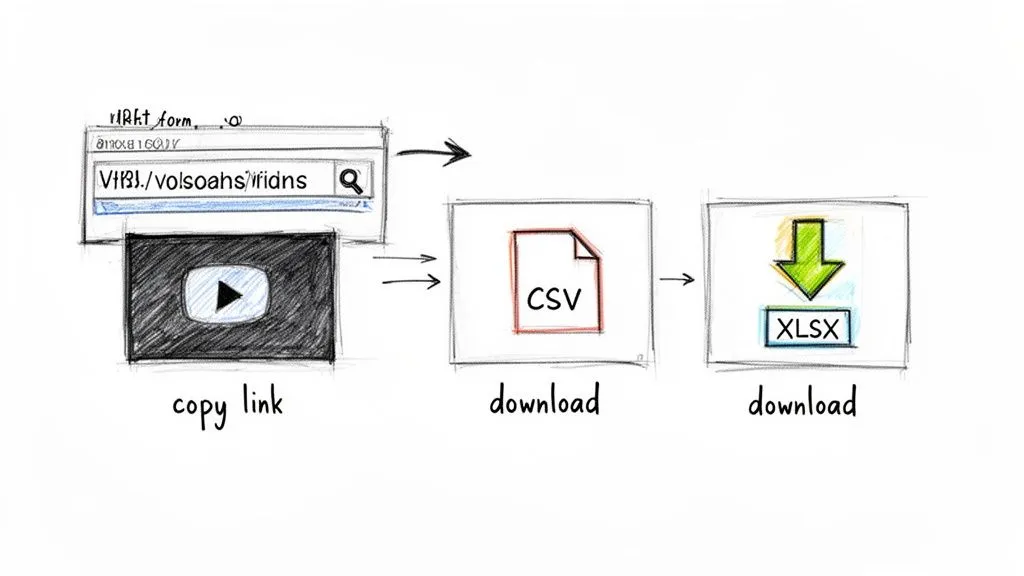
Getting started really is as simple as copy and paste. The YouTube Comments Downloader was built with a clean, no-fuss interface that anyone can pick up, no matter their technical background.
Here’s how it works:
- First, find the YouTube Short you want to analyze and grab the URL using the “Share” button.
- Next, just paste that link directly into the downloader tool and kick off the process.
That’s it. The tool immediately starts fetching all the comments, replies, author details, and other useful bits of metadata. There’s no queue to wait in; you can see the progress in real-time as your file is built. This is perfect for those times when you need insights now.
Choosing the Right Export Format
Once the comments are gathered, you need to export them in a format that you can actually use. While there are a few options, two are perfect for getting started with analysis: XLSX and CSV.
- XLSX (Excel Spreadsheet): For most people, this is the best choice. It gives you a ready-to-use spreadsheet with everything neatly organized into columns. You can open it straight away in Microsoft Excel, Google Sheets, or Apple Numbers to start sorting, filtering, and reading.
- CSV (Comma-Separated Values): A CSV is a simpler, plain-text version of a spreadsheet. It’s a universal format that works with nearly any data tool out there. This is a great option if you plan on importing the comments into a custom database or another program for deeper analysis.
My advice? For your first download, go with XLSX. It’s the most user-friendly format for visual analysis and lets you start spotting trends or finding specific feedback without any extra steps.
The real magic isn’t just grabbing the text of the comments; it’s getting them in a structured file. An XLSX export preserves the entire conversation, including nested replies, timestamps, and like counts, turning a chaotic discussion into an organized dataset you can actually work with.
Why This Beats the Alternatives
Sure, other options exist, but they often have major drawbacks for quick-turnaround research. Trying to manually copy and paste comments is a nightmare. It’s incredibly slow and you lose all the important context, like who replied to whom and when. It might be fine for a video with 10 comments, but it’s completely unworkable for a viral Short with thousands.
You might also look at social media management tools, but many fall short here. For example, a platform like Buffer is great for scheduling, but their engagement features don’t work for YouTube comments. This leaves a huge gap for marketers and creators who need to analyze comment threads.
A dedicated tool lets you download comments from a single YouTube Short efficiently, giving you a focused solution that other platforms simply don’t provide.
Scaling Your Research with Bulk Comment Downloads
When you need to look beyond a single video, you have to scale up. Analyzing one viral Short gives you a snapshot, but seeing the bigger picture requires a much wider lens. That’s where downloading comments from an entire YouTube channel or a specific playlist really changes the game.
This isn’t just about grabbing more data; it’s about doing smarter work. Whether you’re a marketer doing deep competitor analysis, a researcher studying audience sentiment across a video series, or a creator tracking feedback, bulk processing is your best friend. It turns what would be a chaotic mess of individual videos into one clean, unified dataset you can actually work with.
The Power of Channel and Playlist Downloads
Imagine you’re a brand manager who needs to analyze every Short your main competitor has posted in the last three months. Doing this manually? You’d be opening video after video, scrolling endlessly, and trying to spot trends in a sea of comments. It would take days, be incredibly tedious, and you’d almost certainly miss key insights.
Now, picture this: you just grab the channel or playlist URL, and the tool gets to work, pulling comments from hundreds of Shorts at once. This isn’t just a time-saver; it’s a strategic move. You’re suddenly able to perform analysis that was practically impossible before.
For instance, a content team could gather their top-performing Shorts from the last year into a private playlist. By downloading all the comments from that single playlist, they can instantly see recurring questions, popular requests, and the exact language their audience uses. That’s pure gold for planning the next six months of content.
The real value here is finding the patterns you’d otherwise miss. Seeing a few comments asking for a new tutorial is interesting. Seeing that same request pop up across 50 different videos is a clear, data-driven mandate from your audience.
Preserving Metadata for Deeper Analysis
Just grabbing the text of the comments isn’t enough. For any meaningful analysis, you absolutely need the context that comes with it. The YouTube Comments Downloader is built to keep all that crucial metadata, making sure your dataset is rich and ready for a deep dive.
Your export will include key details like:
- Author Handles: See exactly who is commenting, so you can spot your biggest fans or most consistent critics.
- Like Counts: Sort comments by popularity in a single click to find the most-loved feedback.
- Reply Counts: Instantly identify the hot-button topics that are sparking the most conversation.
- Full Thread Hierarchy: Follow the natural flow of a discussion by seeing exactly which replies belong to which parent comments.
Without this information, all you have is a wall of text. With it, you can start asking much smarter questions, like, “What are the most-liked comments on our competitor’s product announcements?” or “Which users are giving us great feedback across our entire channel?” This is how raw data becomes genuinely actionable insight. To see a full breakdown of the process, check out our guide on how to bulk download YouTube comments for large-scale projects.
A Practical Scenario in Action
The YouTube Shorts space is fiercely competitive. The platform is an increasingly critical source of data, especially as the algorithm continues to evolve. We’ve seen channel managers pull 750,000 comments from live chats and community posts and have it all structured with author handles and reply counts in under 30 minutes.
They can even export the data as an HTML file that mirrors YouTube’s interface, which is perfect for presentations. When you need to stay ahead, exploring various tools that integrate with YouTube helps, but a dedicated comment downloader provides a specific advantage. When you see key metrics like average view duration and over 70% retention shoot up alongside a surge in comments, you know this kind of scaled analysis is no longer optional, it’s essential for growth. You can explore more about the analytical power of comments and how they directly influence video performance.
Choosing the Right Export Format for Your Analysis
Getting your hands on the comment data is just the first step. The real magic happens when you start digging into it. When you download comments from a YouTube Short, you’re not just grabbing raw text; you’re creating a dataset. The format you choose for that dataset is a critical decision that will either speed up or slow down your path to finding those golden insights.
Think of it as choosing the right tool for the job. You wouldn’t use a hammer to turn a screw. Similarly, the best file format depends entirely on what you plan to do next. Are you building charts in a spreadsheet, feeding the text into an AI model, or creating a report for your team? Each goal has a perfect format.
This quick decision tree can help you pick the right path from the get-go.
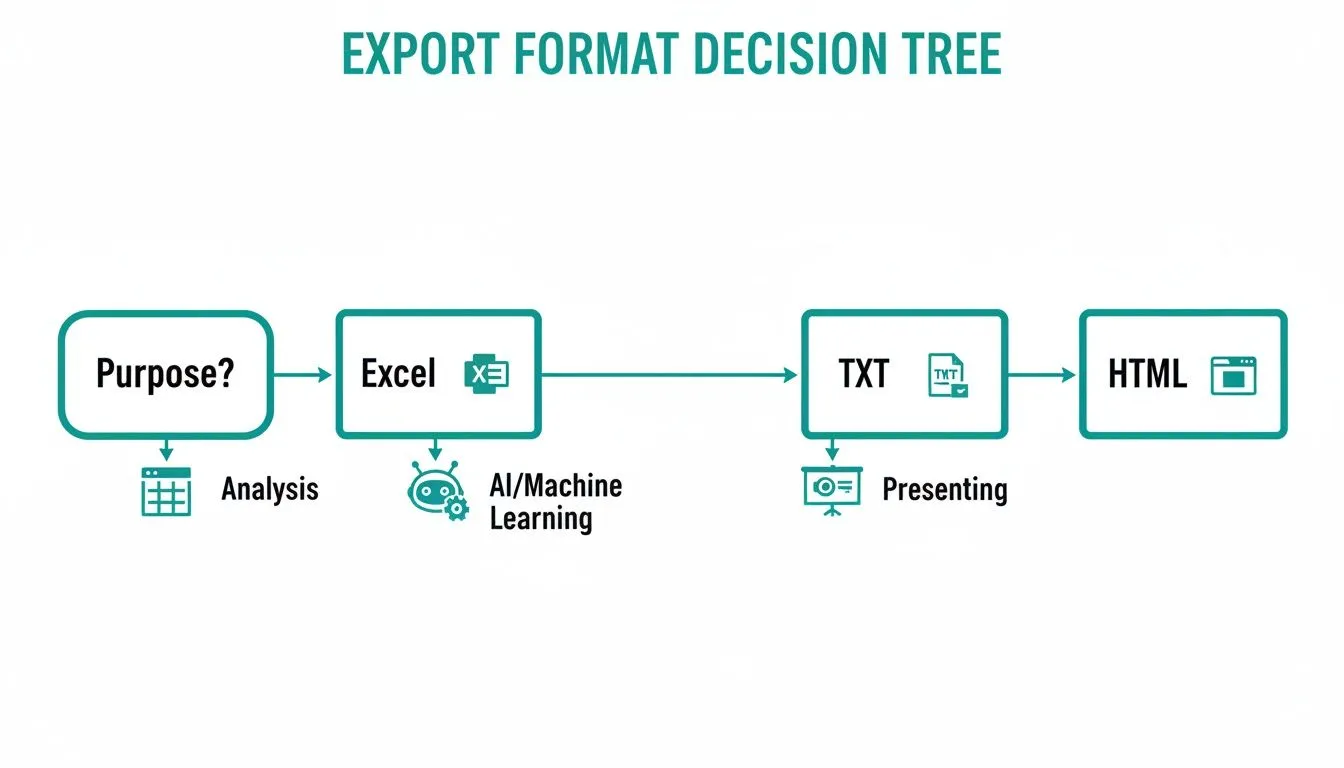
As you can see, your end goal, whether it’s deep analysis, AI processing, or a clean presentation, points you directly to the most practical file type.
When to Use XLSX and CSV for Data Analysis
For most people, especially marketers and creators, XLSX is the MVP. It gives you a spreadsheet that’s ready to open in Microsoft Excel, Google Sheets, or Apple Numbers without any extra steps. All the important data, like the comment text, author names, like counts, and even reply threads, is already sorted into clean, organized columns.
This format is built for hands-on analysis. You can immediately sort comments by the highest like counts to see which feedback really hit home with your audience. Or, you can filter by keywords to track how often people are mentioning a new feature or a competitor. For a social media manager trying to gauge sentiment, an XLSX file is the fastest way to start spotting trends and building charts.
A CSV (Comma-Separated Values) file contains the same structured data but in a more universal, plain-text package. It might not look as polished as an XLSX file, but its real strength is its incredible compatibility. A data analyst would probably choose CSV to import a massive comment dataset into a specialized database or a program like R or Python for some heavy-duty text analysis. It’s the raw, flexible option for more technical work.
Presenting Your Findings with HTML Exports
Let’s be honest: not everyone loves looking at a giant spreadsheet. If you need to share what you’ve found with clients, stakeholders, or anyone who isn’t a data geek, sending them rows of raw data can be overwhelming. The key takeaways can easily get lost. This is where an HTML export really shines.
An HTML file creates a single, self-contained webpage that looks just like the original YouTube comment section. It keeps the profile pictures, nested replies, timestamps, and the entire visual flow of the conversation intact.
Imagine you’re presenting key audience feedback in a meeting. Instead of pointing to a cell in a spreadsheet, you can show a clean, visual snapshot of the actual conversation. It makes the feedback feel more real and is instantly understandable.
This format is fantastic for creating visuals for your presentations or reports. You can screenshot important threads without any on-screen clutter, bringing the authentic voice of your community right into the room.
Leveraging TXT and JSON for AI and Development
With the rise of AI tools like ChatGPT, there are entirely new ways to analyze comments at scale. The TXT export is designed specifically for this. It gives you a clean, text-only file of all the comments, which is the perfect format to feed directly into a large language model.
For example, a startup founder could download comments from a hundred competitor Shorts, export them as a single TXT file, and ask an AI to “summarize the top 5 most requested features.” You can learn more by checking out our complete guide on the different YouTube comment export formats.
Finally, the JSON (JavaScript Object Notation) format is the language of developers and data scientists. It organizes all the comment data into a structured, hierarchical format that’s easy for other applications to parse and understand. A developer building a custom sentiment analysis dashboard or piping comment data into a business intelligence platform would use JSON to make the integration seamless.
Turning Raw Comments Into Actionable Insights
So you’ve downloaded thousands of YouTube Shorts comments. Now what? A spreadsheet full of raw text is a great start, but its real power is unlocked when you turn that data into decisions. It’s time to move past just collecting comments and start generating some serious insights.
The secret is to stop looking at it as a chaotic sea of opinions and start asking specific questions. When you know what you’re looking for, that mountain of text becomes a goldmine of genuine customer feedback.
Finding Signal in the Noise with Smart Search
Your exported file is essentially a searchable database of audience conversations. While the YouTube Comments Downloader has a built-in search function, you can do the same thing right in your XLSX spreadsheet. One of the most helpful features is typo tolerance, which cleverly finds what you’re looking for even when people misspell words.
This is a lifesaver in the real world. Say a beauty brand is tracking feedback on their new “hydrating serum.” The search will catch not just the correct spelling but also “hydratng serum” or “hydrating serim.” You get the full picture without letting simple typos skew your data.
Use this to instantly find mentions of:
- Products or services: What’s the word on the street about your latest launch?
- Competitor names: See how you’re being compared to others in the space.
- Relevant hashtags: Keep up with community trends and discussions.
- Key features: Discover what your audience loves or finds confusing.
Imagine you’re a content creator who just posted a Short about a new camera. Instead of endless scrolling, you can search your exported comments for terms like “price,” “battery,” and “low light.” All the relevant feedback is instantly grouped, giving you clear topics to address in your next video.
This simple search is your first step in transforming a messy comment section into an organized source of market intelligence.
Monitoring Sentiment and Validating Ideas
You can take this a step further by using keyword searches to get a read on audience sentiment. I see social media managers do this all the time to keep a pulse on brand health. Exporting comments from a few key Shorts and searching for positive or negative terms gives you a quick, honest look at public opinion.
For instance, a gaming studio could search for words like “love,” “amazing,” and “fun” to pull together testimonials. On the flip side, searching for “bug,” “crash,” and “disappointed” helps them flag critical issues that the dev team needs to see immediately.
This method is also fantastic for entrepreneurs trying to validate a business idea. Thinking of launching a line of sustainable pet toys? Download comments from a dozen Shorts in the “eco-friendly pet” niche and search for phrases like “I wish someone made” or “I’m looking for.” You’ll uncover unmet needs straight from your target customers. To really turn these downloaded comments into a strategic advantage, it helps to ground your work in the principles of a complete guide to social media measurement.
Unlocking Deeper Insights with AI
For a more sophisticated analysis, the clean TXT export is your best friend. It’s designed to be fed directly into AI tools like ChatGPT, allowing you to perform complex tasks in just a few seconds. Our companion GPT is built specifically for this.
You can ask it to do the heavy lifting for you:
- Perform thematic analysis: “What are the top 5 themes people are discussing in these comments?”
- Generate sentiment scores: “Classify these comments as positive, negative, or neutral and give me a summary.”
- Summarize key points: “What are the most common questions people are asking here?”
In the fast-paced world of YouTube Shorts, comments are more than just chatter, they’re a critical part of the algorithm. Virality depends on strong performance metrics. Data from top Shorts shows that hitting a 70-75% ‘stayed to watch’ rate, combined with high comment engagement, is essential. For social media managers, this is huge: Shorts comments can drive 2.5x the engagement of long-form videos.
Our tool streamlines this by processing comments in bulk and exporting them into an AI-ready TXT format. Entrepreneurs are already using this to validate business ideas against millions of public opinions. You can learn more about the importance of comment engagement to see just how vital this is.
Ultimately, the ability to download YouTube Shorts comments is about giving yourself the data to stop guessing and start knowing. The answers are right there in the comments; you just need the right tools to find them.
Frequently Asked Questions
Even when a tool is easy to use, it’s natural to have a few questions. We get it. Here are the answers to some of the most common things people ask before they start digging into YouTube Shorts comments.
Is It Legal and Safe to Download YouTube Shorts Comments?
Yes, absolutely. Using a tool like YouTube Comments Downloader is both legal and safe because it only gathers data that’s already public. It works within YouTube’s terms of service, so you’re not breaking any rules.
Think of it this way: you’re not seeing anything a regular user couldn’t see. The tool simply automates the process of collecting and organizing those public comments for you. Most importantly, it never asks for your YouTube login or personal details, so your account is always secure.
You’re not accessing private data or trying to get around any platform restrictions. It’s just a much faster, smarter way to collect public information, a common practice for anyone doing market research or audience analysis.
Can I Download Comments from a Private or Unlisted YouTube Short?
No, and that’s by design. The tool can only access comments from public videos. This is a core part of how we ensure everything is done ethically and respects the privacy choices of creators.
If a Short is set to ‘private’ or ‘unlisted,’ the comments associated with it aren’t public information. Our system is built to honor those settings, so it won’t be able to see or fetch them.
How Many Comments Can I Download at Once?
This is where a dedicated tool really shines. While trying to do this manually falls apart quickly, our system was built to handle huge volumes of comments without breaking a sweat.
- Our paid plans are designed for serious, large-scale research projects.
- We’ve had customers successfully pull comments from up to 3,000 videos in a single job.
- That can easily total 750,000 comments, with the entire process often finishing in under 30 minutes.
So whether you’re analyzing one viral Short with a massive comment section or an entire channel’s history, the system is more than capable of keeping up.
Will the Downloaded File Include Replies to Comments?
Of course. What good is a list of comments without the actual conversations? One of the most important features is how it preserves the entire thread structure.
When you export your file, you’ll see all the replies nested neatly under their parent comments. The export includes all the metadata needed to maintain that hierarchy, so you can easily trace who replied to whom. This context is everything if you want to understand what’s really going on in the comments.
What Makes This Better Than Other Methods?
You have other options, but they all come with significant drawbacks. Trying to copy and paste by hand is a non-starter for anything more than a dozen comments. It’s incredibly slow, you’ll make mistakes, and you lose all the important data like replies, timestamps, and like counts.
Other tools might seem like a good idea, but they are often difficult to set up, require technical skill, or break whenever YouTube updates its site layout. They simply weren’t built with the specific goal of comment analysis in mind. That’s why a specialized tool designed specifically to download YouTube Shorts comments is the clear choice for anyone who needs clean, structured, and reliable data without the headache.
Ready to turn those messy comment threads into actionable insights? With YouTube Comments Downloader, you can transform chaotic conversations into clean, analysis-ready data in just a few clicks. Start your free trial today and discover what your audience is really talking about!