6 months ago
Outscraper vs YouTube Comments Downloader: 2026 Guide
When you’re deciding between Outscraper and YouTube Comments Downloader, the right choice really boils down to one question: are you just scratching the surface, or do you need to go deep into YouTube comment data? For anyone serious about high-speed, in-depth analysis of YouTube comments, the answer is clear. YouTube Comments Downloader is the specialist’s tool, built from the ground up for this exact purpose. It excels at capturing complete conversational threads, a crucial feature for any meaningful research.
Choosing Your YouTube Comment Analysis Tool
The first decision in any data project, choosing between a specialized tool and a jack-of-all-trades, can make or break your results. If YouTube is your primary focus, this choice directly impacts the speed, depth, and ultimate quality of your insights.
YouTube Comments Downloader was purpose-built to do one thing exceptionally well: extract YouTube comments. It’s for people who need more than a simple data dump. Think of:
- Marketers performing sentiment analysis across thousands of comments on a new campaign.
- Researchers who need the full context of online discussions, including all replies.
- Creators digging for content ideas hidden in their community’s feedback.
On the other hand, many generalist services treat YouTube as just another checkbox on their list of data sources. They can pull comments, sure, but they are not architected for the sheer volume and speed that serious YouTube analysis demands. This often means slower processing, missing data, and a frustrating experience for anyone with a YouTube-centric project.
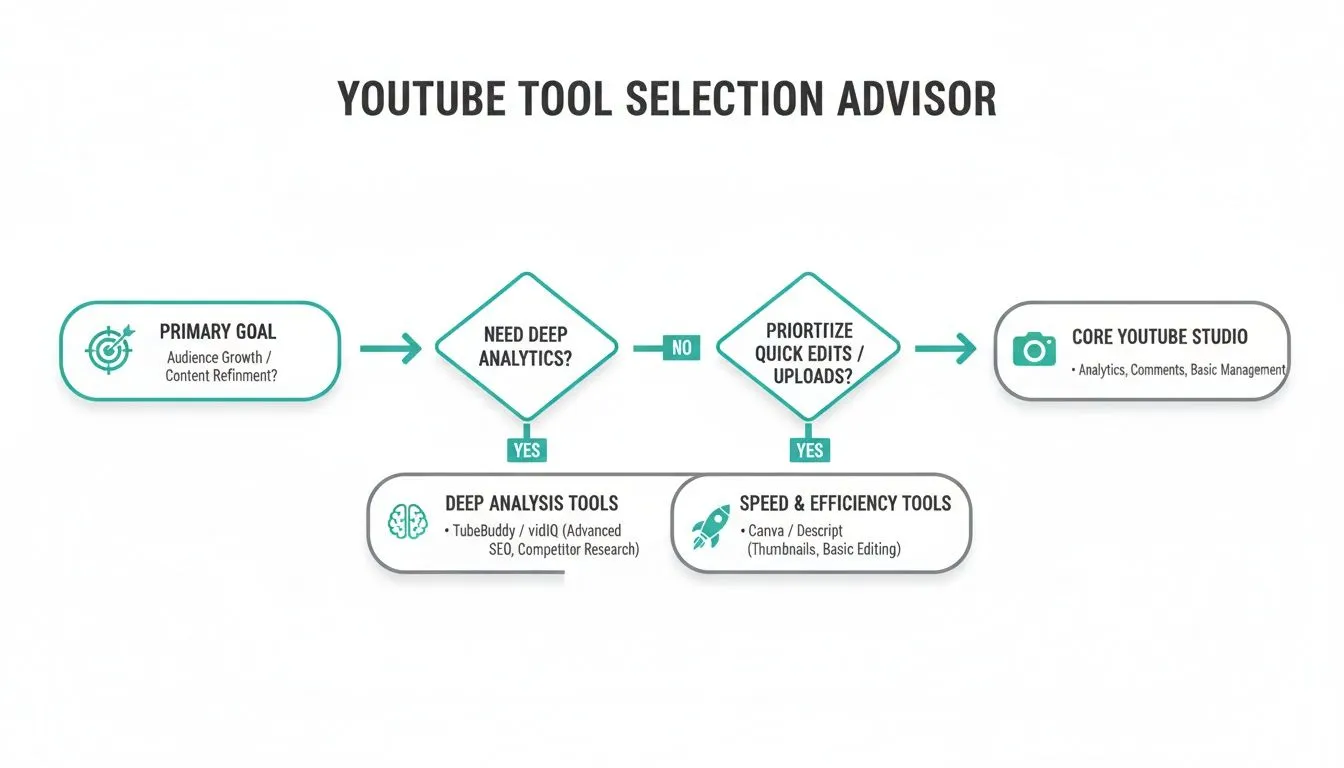
This flowchart helps visualize that decision. If your work demands speed and deep analytical capabilities for YouTube, a specialized tool is the only way to go.
Quick Comparison YouTube Comments Downloader vs Outscraper
To put the differences in stark relief, here’s a quick side-by-side look at what sets these two tools apart. This table cuts through the noise and highlights the core distinctions to help you make a fast, informed decision.
| Criterion | YouTube Comments Downloader | Outscraper |
|---|---|---|
| Primary Focus | Specialized for YouTube (Videos, Shorts, Live Chats) | Generalist service with a YouTube comment extraction feature |
| Data Depth | Preserves full thread hierarchy and rich metadata | Provides basic comment data, often without full context |
| Processing Speed | Optimized for bulk, high-speed extraction with no queues | Task-based system; can involve queues and slower processing |
| Use Case | Ideal for deep sentiment analysis and audience research | Suitable for occasional, low-volume YouTube comment extraction |
As you can see, the core difference is focus. A tool designed for a single, complex job will almost always outperform one that tries to do everything.
The most critical differentiator is the engineering focus. YouTube Comments Downloader was built from day one to master the unique structure and scale of YouTube’s comment sections, giving it an undeniable edge for anyone whose work depends on YouTube data.
When you need to pull comments from hundreds or thousands of videos quickly, that specialization is not just a nice-to-have feature; it’s a fundamental requirement. Compromising with a generalist tool often means sacrificing both efficiency and the quality of your insights.
If you want to dive even deeper into this topic, our guide on the best YouTube comment scraper for 2026 offers more comparisons and insights.
Performance And Speed For High-Volume Analysis
When you’re deep in data analysis, speed is not just a nice-to-have; it’s what gives you a real edge. Comparing Outscraper and YouTube Comments Downloader on performance, the biggest difference is not just a minor feature, it’s how they are fundamentally built to handle large jobs. This core distinction can make or break your workflow.
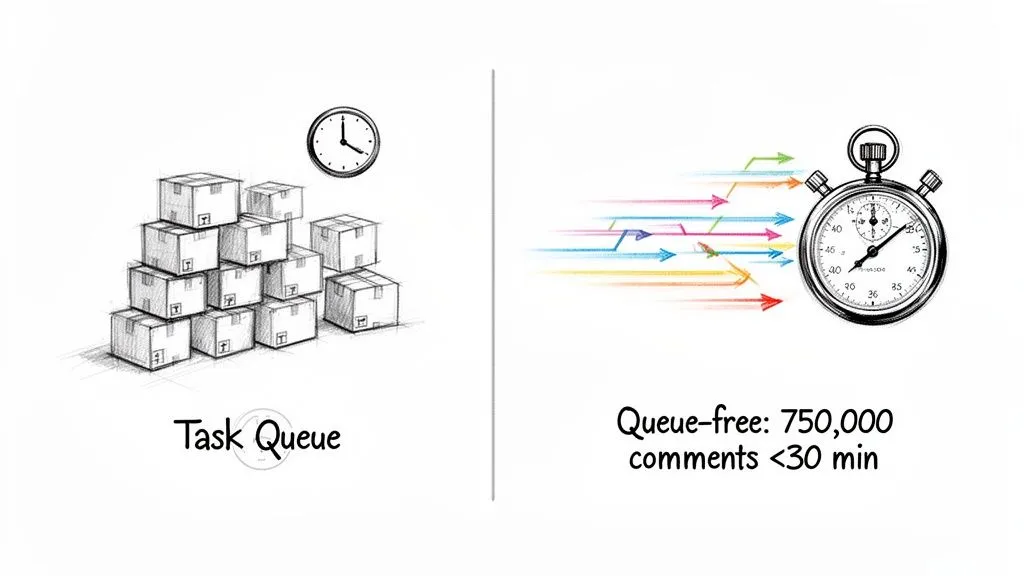
YouTube Comments Downloader was built with a queue-free architecture. This is a critical detail. It means your jobs start the moment you hit “go,” without getting stuck in line behind other users or even your own previous requests.
This immediate processing is a lifesaver for any time-sensitive project. Imagine you need to gauge sentiment on a video that just went viral or track reactions to a breaking news story. In those moments, waiting in a queue for minutes, or even hours, is simply not an option.
The Power Of Instant Bulk Processing
The real muscle of this queue-free system flexes when you’re collecting data at scale. YouTube Comments Downloader is optimized to chew through massive datasets with surprising speed.
For example, you can pull 750,000 comments from 3,000 different videos in under 30 minutes. That’s the kind of throughput that lets researchers track large-scale digital trends or marketers monitor feedback across an entire brand channel in a single morning. It turns what could be a multi-day slog into a task you finish before your coffee gets cold.
For professionals who can’t afford to wait, this is the key differentiator. The ability to pull hundreds of thousands of comments on demand makes YouTube Comments Downloader the more practical tool for high-stakes analysis.
Contrasting With A Task-Based System
Outscraper, while a capable tool for its purpose, works differently. It uses a task-based system where your job is added to a list. While this model is fine for some uses, it can introduce friction into a high-speed workflow with things like task queues and confirmation pop-ups.
This approach is better suited for users who need to perform occasional data extractions across various platforms. But if you’re laser-focused on harvesting a huge volume of YouTube comments right now, every extra click and confirmation screen slows you down. For anyone needing to iterate on their analysis quickly, this can become a frustrating bottleneck.
While Outscraper is known for its ease of use, a 2024 survey of social media managers found that 68% prioritized speed over sheer volume for time-sensitive projects, preferring queue-free tools. This is where the specialized focus of YouTube Comments Downloader gives it a clear advantage for its target audience.
The difference in approach is clear. One tool is a generalist built for queued tasks, while the other is a specialist built for immediate, high-volume YouTube data extraction. This becomes even more crucial when automating your workflows, a topic we dive into in our article on the YouTube comment scraper API. If your work demands speed and agility, a system without queues is the obvious winner.
Data Quality And Export Flexibility For Deep Insights
Raw data is just noise. It’s what you can do with that data that really matters, and the quality of the export is what separates a useful tool from a frustrating one. When you’re trying to move from data collection to real analysis, this is where the differences between Outscraper and YouTube Comments Downloader become crystal clear.
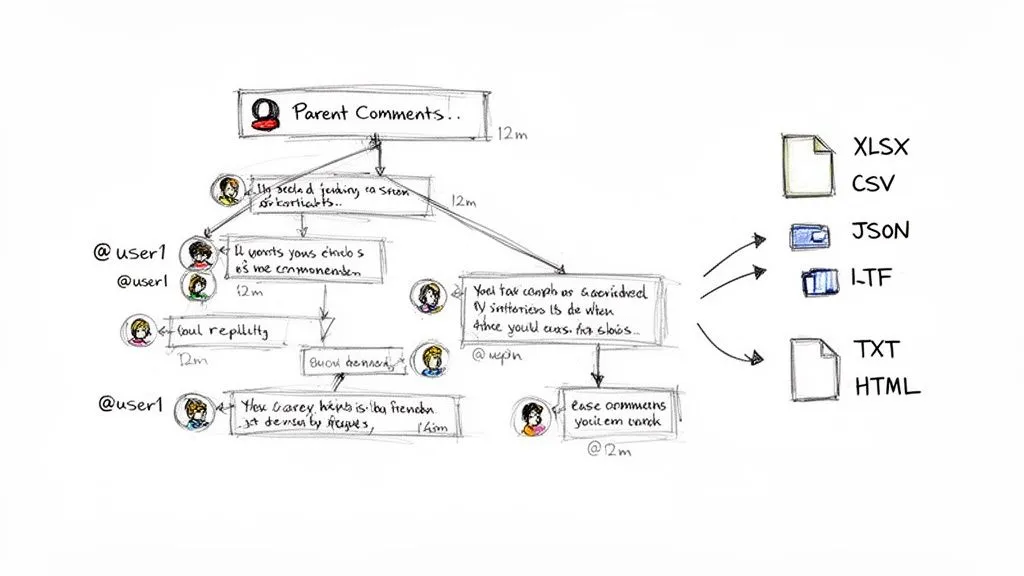
YouTube Comments Downloader was clearly built by people who have actually done this kind of analysis before. It does not just pull a list of comments; it meticulously preserves the entire thread hierarchy. This means every reply is correctly nested under its parent comment, keeping the natural flow of conversation intact. Without that, a lively debate just becomes a jumbled mess of disconnected remarks, and you lose all the context.
The Details That Make Analysis Possible
Think about trying to gauge reactions to a product launch. A top-level comment might be positive, but the replies could be full of users pointing out a critical flaw. YouTube Comments Downloader captures this entire picture by including the metadata you actually need for analysis:
- Author Handles: So you can track influential community members or repeat commenters.
- Permalinks: A direct link to jump straight to the original comment on YouTube to see it in its native environment.
- Timestamps: Essential for tracking how a conversation unfolds over time.
- Reply Counts: Let you instantly identify the most engaging or controversial discussion points.
This is not just about having more data; it’s about having the right data to understand the story behind the comments.
The Problem With “Good Enough” Exports
Outscraper can certainly pull comments from YouTube, but its output often feels like a generic data dump. It gives you the raw text, but that crucial conversational structure and rich metadata are not always there. What this means in practice is that your work is just beginning when the download finishes.
You could end up spending hours in a spreadsheet trying to manually piece threads back together or cleaning up the data just to make it usable. This completely defeats the purpose of using an automated tool and introduces a high risk of error. If your goal is to do a serious deep dive, starting with a dataset that needs a ton of manual labor is a major roadblock.
It’s not just about getting the comments. It’s about getting them in a state that’s ready for immediate analysis. YouTube Comments Downloader is designed to deliver that from the get-go, saving you time and headaches.
Export Formats That Fit Your Workflow
Beyond the data’s structure, you need flexibility in how you export it. Different projects require different tools, and your data needs to be ready to go. This is another area where YouTube Comments Downloader is built for practical use.
It offers a whole suite of export options to match whatever you’re trying to do:
- XLSX & CSV: The go-to formats for anyone working with spreadsheets or databases. For a deeper look at this, our guide on how to export YouTube comments to CSV has some great tips.
- JSON: The perfect choice for developers who need to integrate the data into custom applications or other platforms.
- HTML: This option creates a self-contained, offline webpage that looks just like the YouTube comment section. It’s fantastic for reports or presentations where visual context is key.
- TXT: While it seems basic, this format is incredibly useful today. The text files are structured perfectly for direct import into AI models like ChatGPT, allowing you to run sentiment analysis, summarization, or other tasks without any pre-processing.
This range of options ensures your data can flow directly into Excel, a Python script, or an AI model without friction. In the Outscraper vs YouTube Comments Downloader matchup, this focus on clean, structured, and versatile exports gives YouTube Comments Downloader a decisive advantage for anyone serious about audience research.
Practical Use Cases For Creators, Researchers, And Marketers
Technical specs are one thing, but how these tools perform in the real world is what really matters. When you’re deciding between Outscraper and YouTube Comments Downloader, the best way to choose is to see how they handle the actual jobs you need to get done. Your specific goals will point you to the right tool.
For anyone trying to make sense of public opinion, be it a marketer, creator, or academic, YouTube comments are an absolute goldmine of unfiltered feedback. The real challenge is pulling that data out quickly and getting it into a format you can actually work with. This is where a dedicated tool truly shines.
For Marketers: Rapid Sentiment Analysis
Picture a marketing team that just launched a huge campaign across a series of YouTube videos. They need to know, right now, if the message is hitting home or falling flat. For them, speed is everything.
With YouTube Comments Downloader, the team can drop in the URLs for all their campaign videos and start pulling comments immediately. There’s no queue, so they are not stuck waiting. In just a few minutes, they have a complete dataset ready for analysis.
- Advanced Search: They can use the built-in search to filter for keywords like “love,” “hate,” “confusing,” or “broken.” This instantly sorts the feedback into different piles.
- AI-Ready Exports: The comments export into a clean TXT file, perfect for feeding directly into an AI model like ChatGPT to get a quick sentiment summary.
- Actionable Insights: This fast feedback lets the team spot problems and adjust their strategy on the fly, something that would be painfully slow using a general-purpose tool with a queuing system.
For Researchers: Preserving Digital Discourse
An academic researcher studying online communities or digital conversations needs to see the full context. A flat list of comments just will not cut it; the back-and-forth is where the real meaning is found.
For instance, a researcher tracking how misinformation spreads needs to follow how ideas are challenged, defended, and amplified within comment threads. This is where YouTube Comments Downloader’s ability to preserve the full comment thread hierarchy is a game-changer.
When studying online conversations, losing the reply structure is like tearing pages out of a book. YouTube Comments Downloader’s commitment to data fidelity ensures that researchers get the complete story, not just disconnected sentences.
By exporting data with nested replies, author handles, and timestamps, a researcher can reconstruct the entire conversation with total accuracy. That level of detail is essential for credible academic work and is a feature where more general tools often fail.
For Creators: Discovering Content Ideas
A YouTube creator’s audience is their most valuable resource. The comment section is a direct line to what viewers are thinking, what they’re curious about, and what they want to see next.
A creator can use YouTube Comments Downloader to scrape all the comments from their channel. By searching for question marks (“?”) or phrases like “can you make a video about,” they can instantly generate a list of video ideas straight from their most dedicated fans. Of course, digging into comments is just one of many various YouTube use cases that can help creators grow.
It’s true that tools like Outscraper’s YouTube Comments Scraper were notable when they first appeared, processing a high volume of tasks and empowering analysis with a simple copy-paste. But as YouTube exploded to over 122 million daily active users in the US by 2025, the need for speed and scale changed. A 2025 benchmark revealed YouTube Comments Downloader could process playlists from 100 channels in a matter of hours, a job that could take days with a video-by-video approach, showing its modern design is built for today’s high-volume needs. You can dig more into the history and comparisons by reviewing tips on YouTube scraping tools from Outscraper.com.
In each of these scenarios, the specialized features of YouTube Comments Downloader offer a distinct advantage. For any professional who needs to pull deep, actionable insights from YouTube, it proves to be the more practical and powerful choice.
Comparing Pricing Models And Long-Term Value
When you’re evaluating tools, the price tag is just the starting point. The real question is about predictable costs and the value you get over the long haul. Looking at Outscraper and YouTube Comments Downloader, their pricing could not be more different, and your choice will come down to how often you’ll be running these tasks.

Outscraper runs on a pure pay-as-you-go model. If you just need to pull comments from a video once in a blue moon, this can seem appealing. You avoid getting stuck in a subscription for a tool you barely touch.
But for anyone doing regular analysis or handling big projects, that metered approach gets tricky fast. Costs can swing wildly depending on how much you use it, making it nearly impossible to budget accurately. This is exactly where YouTube Comments Downloader shines by offering a much more stable and predictable path.
Flexible And Predictable Pricing Options
YouTube Comments Downloader gives you a few clear, structured ways to pay, so you can line up your spending with your actual workflow. This completely removes the risk of a surprise bill at the end of the month.
You can choose from:
- Pre-paid credits perfect for one-off projects where you want a fixed cost for a set amount of data.
- Subscription plans built for marketers, researchers, and creators who need ongoing access.
- A lifetime license for the desktop app, which is a game-changer for heavy users looking for the best long-term value.
This kind of tiered pricing gives you total control over your expenses.
For serious professionals, predictable costs are essential for project planning and ROI calculation. The lifetime license for YouTube Comments Downloader is particularly compelling, as it transforms a recurring operational expense into a one-time investment.
Value Beyond The Initial Cost
The difference in pricing really points to a difference in philosophy. Outscraper, on its YouTube comments scraper page, has processed a high number of tasks since launching, which shows its appeal for a wide range of extraction jobs. But its pay-as-you-go system often means your tasks sit in a queue, which can be a dealbreaker when you’re on a deadline.
This is where YouTube Comments Downloader’s value becomes crystal clear, especially for bulk operations. It can process 3,000 videos and 750,000 comments in under 30 minutes with no queues. The pricing is built to support serious YouTube analysis by getting rid of both unexpected costs and frustrating delays.
The Final Verdict: Which Tool Is Right for You?
So, after breaking down the speed, data quality, features, and pricing, which tool should you actually choose? The answer really depends on what you’re trying to accomplish.
If you’re a user who only needs to pull YouTube comments every once in a while as part of other data collection activities, Outscraper is a perfectly fine option. It gets the job done for low-volume, infrequent tasks where top speed and deep contextual data are not critical. Think of it as a utility in a larger data collection toolbox.
The Clear Choice for YouTube Professionals
However, if your work truly revolves around YouTube, the decision becomes much clearer. For any creator, marketer, or researcher who needs fast, deep, and reliable YouTube data, YouTube Comments Downloader is the superior choice. It was not built to be one of many features; it was built from the ground up specifically for the complexities of the YouTube ecosystem.
This laser focus pays off in real-world advantages:
- Blazing-Fast Speed: Its queue-free design means you can process thousands of videos and hundreds of thousands of comments immediately. No waiting in line, which is a massive plus for time-sensitive projects.
- Complete Data Exports: It pulls comments from regular videos, Shorts, and even live chat replays, giving you the full picture of audience engagement across the platform.
- Ready-to-Analyze Data: By preserving the entire thread hierarchy and providing clean export formats, it saves you hours of manual data cleanup.
If your goal is to get the most value from YouTube comments with the least amount of friction, YouTube Comments Downloader is the obvious winner. It’s designed to get you from raw data to actionable insights as quickly as possible.
When it comes to Outscraper vs. YouTube Comments Downloader, the verdict is pretty straightforward. While Outscraper is a capable part of a general data extraction kit, it cannot match the performance and data fidelity of a dedicated, specialist tool. For anyone serious about YouTube analysis, the focused design, faster processing, and richer data from YouTube Comments Downloader make it the best-in-class solution for getting professional results.
Frequently Asked Questions
Still weighing your options? Let’s tackle some of the most common questions that come up when people compare YouTube Comments Downloader and Outscraper. These are the details that often make the final decision.
Can I Analyze Comments From YouTube Shorts And Live Streams?
Yes, you can, and this is a critical difference. YouTube Comments Downloader is designed to extract comments from standard videos, Shorts, and live chat replays. This means you get a complete view of a channel’s engagement, which is essential for any serious analysis today.
Outscraper’s YouTube tool, on the other hand, really only focuses on standard videos. You would be missing out on the explosive growth of Shorts and the real-time feedback from live streams, leaving a significant gap in your data.
For a complete analysis of a channel’s community, you need data from every type of content. The ability to pull comments from videos, Shorts, and live chats gives YouTube Comments Downloader a clear edge for comprehensive research.
Is YouTube Comments Downloader Difficult To Use?
Not in the slightest. Its interface is clean, simple, and requires absolutely no coding. If you can copy and paste a video or channel URL, you have all the technical skills you need to start downloading comments in minutes.
This makes it a go-to tool for a wide range of users. Whether you’re an academic researcher who needs data without a technical headache or a creator just looking for quick audience feedback, it’s built to be accessible.
Which Tool Is More Cost-Effective For Large Projects?
When you’re dealing with a lot of data or running analyses regularly, YouTube Comments Downloader offers much better long-term value and predictability. The subscription plans and lifetime license option give you a fixed cost you can actually budget for.
This is a stark contrast to Outscraper’s pay-as-you-go model, where costs can quickly add up and become unpredictable, especially on large-scale projects. For anyone who works with YouTube data consistently, a predictable subscription or a one-time purchase almost always ends up being the more economical choice.
Ready to get fast, deep insights from YouTube comments? See what a difference a specialized tool makes. Get Started with YouTube Comments Downloader for Free